Tuesday, August 31, 2010

Precision Camera Update: Pending Parts

I picked Precision Camera to repair my Canon because they boasted fast turn-around times (time is money) and a large inventory of parts (and a few other reasons I hope won't also become significant in the near future). Oh for the days when I had a real cannon and didn't care if it worked or not.

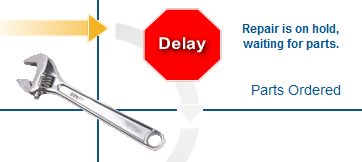
So the process flowchart on Precision Camera's customer status page now displays a bright red STOP sign and the words: "Repair is on hold, waiting for parts."

And no, I haven't a clue what parts. I assumed my shutter release assembly malfunctioned. Shutter release assemblies malfunction all the time (on Canon cameras), so you'd think they'd have the parts in bulk. Besides, the video of a malfunctioning Canon camera I saw on YouTube made the same clickety sounds, and it had a malfunctioning shutter release assembly, too.

So here I sit not knowing what is wrong with my camera or how long it will take to fix, and I can only hope the repair won't cost more than I'd hoped. I'd rather know now. If I do need to buy a new camera, I'd rather do it sooner than later so I can shoot some more weddings and start making up for the loss.

Oh well. The Missus reports that several people commented favorably on the photos she took to work to decorate her (Borg) cube where she continues to resist assimilation. One colleague apparently mistook them for calendar photos.

I think I'm going to teach myself matting and framing.

© 2010 - Robert Lawton, all rights reserved

Sunday, August 29, 2010

Photo Processing

Precision Camera finally confirmed my camera arrived, and it's now in "repair status."  Please don't send me any more nightmare stories about Precision Camera.  It's not helping.

So now I'm ameliorating some of my photography withdrawal symptoms with a bit of photo printing. Typically I just edit photos and burn them to disk for clients. I have very little of my own work on display around the house. I do have two boxes of old frames I haven't unpacked since we moved five years ago.

Coincidentally, I ordered self-adhesive backing boards a few weeks ago, so now's my chance to put my hands on some prints.  Backing boards provide a nice firm surface on which to affix images.  This prevents them from curling or sliding around inside of picture frames. An old camera hand taught me how to apply the prints one day years ago when I looked over his shoulder while pretending to browse lens filters.

I use Walgreen's for printing because I can upload full resolution photos and securely share them for free. The prints I have to pay for, but the price is reasonable. Though Walgreen's claims they don't adjust the photographs if you click the little radio button for that option, they do anyway. And no, it's not my monitor. My monitor is calibrated by hand for photography, and the only pictures that turn out badly are exactly the photos you'd expect to turn out badly if the printer automatically adjusted the images.

So I picked out some pictures Walgreen's couldn't possibly screw up, and ordered 8x10 prints. They only took an hour, and they turned out well. I mounted them on backing board and affixed strip magnets to the back so The Missus could take them to work on Monday.  For now, they're stuck to the 'fridge like so much kindergarten artwork.

© 2010 - Robert Lawton, all rights reserved

Friday, August 20, 2010

The Wait Begins

My busted camera hit the mail on Monday for shipping to Precision Camera. I even sprang the extra buck for a tracking number. The USPS confirmed delivery on Wednesday. Precision Camera's website, however, doesn't know it has arrived yet.

At least I have the USPS' word on it. I'm going to sleep with that little slip of paper under my pillow and see if I wake up feeling better in the morning.

© 2010 - Robert Lawton, all rights reserved

Sunday, August 15, 2010

Camera Repair

As noted in my last post, my Canon 20D went wonky on Saturday. It's still wonky. I prefer this, as things that go on-again off-again wonky really bother me. I like dependability, even in failure.

Like any cheap bastard techno-geek, I started pricing new cameras to find the best bargain for a new or lightly used camera. What I want is a Canon EOS 5D Mark II. If I get it, I'll need a new wide-angle lens, too.

It didn't take long before I found myself reading various technical forums to see if I could repair the 20D myself. I had some hopes for this approach since I fixed my flash last year with a $15 part.

In this case, the parts I needed ran around $40. I even found a couple of videos illustrating the project. In one of the videos, the techno-guy even got the camera to work again. Everyone else advised sending the camera to a repair shop. Back to Google I went.

In the end, I selected Precision Camera. I especially liked that they were Canon authorized (not that my camera was in warranty), had a large inventory of parts on hand, boasted quick turn around times, offered a flat rate, and would provide my camera's status online. I only wished they were local so I could pester them in person every day. I couldn't find a local shop that wouldn't just send it out anyway. The last time I sent a camera part out for repair like that, I never saw my lens again.

So my battle scarred Canon is now wrapped up, labeled, and ready to ship in the morning.  I'm already feeling naked without it.  Maybe I can use my weekends to edit some of the 100k photos I've shot over the last five years.

© 2010 - Robert Lawton, all rights reserved

Saturday, August 14, 2010

I'd Like a New Camera

In a fit of industriousness, I've taken to photographing weddings as an assistant. It's been a learning experience. Today I learned I want a new camera. But that's the end of the story.

The story starts with the lead photographer showing up with a malfunctioning camera and no back-up. Rule one for professional wedding photographers: always bring a backup camera, your assistant's camera is not your backup camera.

Since I'm a poor assistant (pun intended), I don't have a backup camera to loan her, so we shared mine. This worked through most of the wedding, though I have no doubt the bride wondered why she paid for two photographers with just one camera between them. I wondered, too.

This particular story ends right before the cake cutting, bouquet toss, and the daddy/daughter & mother/son dances. Specifically, the story ends when my shutter release mechanism goes wonky and won't stop clicking. This typically happens when a Canon reaches the end of its serviceable life. I haven't counted shutter clicks, but I'd guess it's right around 100k. Given how far and wide this camera has traveled, I'm not disappointed - except, of course by the timing. I don't think I'm going to get paid for this gig.

© 2010 - Robert Lawton, all rights reserved

Sunday, August 30, 2009

Full System Restore

This is a follow up to last week's note about the Avi Ben Stella hoax/keyword attack.

In spite of three layers of firewalls, a couple of anti-virus software packages, and an alarm that something was trying to get "in" - one of the "Avi Ben Stella" websites did manage to infect my computer.

Fortunately, I do nightly backups and clone my hard drive periodically. Rather than "clean" my system of some bug that my anti-virus software missed the first time, I just wiped out the drive and was back in business in a few minutes.

How?

Step 1: Removed infected drive. My new computer case makes this easy. This took about two minutes because I have a messy desk.

Step 2: Installed spare drive with the most recent clean image. This takes about two minutes because I keep the drive in a fire-proof box, and I stopped by the 'fridge for a soda first.

Now my computer looks just as it did a couple of weeks ago.

Step 3: Installed whatever system updates my software vendors pushed down since I created the backup image. The key updates to get are operating system and anti-virus software. I guess I don't have to do this right away, but why wait? It doesn't hurt that I keep a software update log, but that's way too geeky for most people.

Now my computer is up to date, but my working files are a couple of weeks old.

Step 4: Reload from last night's backup my current working files. I'm now back in business. Later, I'll go back and restore all my files from backup while taking care not to overwrite today's work. I'll let that run overnight because it takes a couple of hours. I have a lot of files.

Total time - <10 minutes.
Total cost - $0.

Preparing for the incident cost me $150 for a spare 1.5 TB drive, $50 for an internal hard drive docking bay, and $50 for imaging and backup software. The docking bay isn't entirely necessary, but it's very convenient because it lets me use hard drives as if they were floppy disks. Remember those?

I also use a spare 500 GB drive salvaged from a failed external Western Digital USB back-up device. I don't count this last item as an expense because I consider Western Digital drives to be worthless anyway. I bought one external 1TB USB Western Digital drive. It failed, I replaced it, and the replacement failed - as did its replacement. Mean-time-between failures: about 12 months. At least Western Digital has great customer service. I use their hardware for paperweights now.

With $200 of back-up hardware, one might ask why not just get a backup computer instead.

I have one.

I set it up for my kids. They don't get hand-me-downs. If my hardware fries, as it has in the past, I want something on which I can run big data jobs. It also serves as the family's digital video recorder and multi-media center. An underpowered box with a creaky old operating system won't do. My kids have the fastest box on the block - next to mine.

I don't believe in using technical failure as an excuse for blown deadlines. I also have three uninterrputed power supplies and a backup generator. No, I'm not a fan of our utility company, either.

Last step: I'll go ahead and wipe the buggy hard drive and load a fresh image on it. That'll take a couple of minutes of my time, but I'll need to let it run overnight. My computer definitely works harder than I do.

© 2009 - Robert Lawton, all rights reserved
Tuesday, August 25, 2009

Avi Ben Stella - Social Engineering at its "Best"

There’s an "Avi Ben Stella" message going around about a kid in a coma. It's obviously a hoax, but it is more than that. It is a social engineering attack aimed at those who Google suspected hoaxes for more information.

How does this attack sucker the cautious? The "Avi Ben Stella" name is unique, so people who Google it will find the "right" web page - a page loaded with malware which will try to auto-download and infect their computer.

Best bet? As with all other messages of this nature, don't "pass it on". But in this case, don't even Google it.

And yes, I found this out the hard way. I first checked Snopes which listed it as “undetermined”. However, this is a new form of attack, and it's a new message, so I then searched Google in depth. I soon I hit a few of the earliest web pages with this key term. When I did, my firewall went into a frenzy, and I had to close the infected web page via the Task Manager.

So now we have it: a social engineering attack that takes advantage of “safe” behavior – Googling before posting or forwarding "to everyone you know". Those who want to play it safe should forego Googling and stick to trusted sites (like Snopes) and search within those sites for more information. It's not as broad a search, but it's safer.

As far as social engineering goes, it's pretty clever. It’s like infecting condoms with aids before they are used - only those who exercise due care are vulnerable.

Incidentally, this "keyword" approach to steering people to a specific web page has been used for years on auction and dating websites to help customers bypass the site's fee system.

© 2009 - Robert Lawton, all rights reserved